10 Tips to Organize and Store Charging Cables

Time:2026-11-13 Author:Aria
0%

Charging cables have a talent for gathering in the least convenient places: behind a nightstand, beside a laptop, or tangled around a power strip. A small tangle can waste time and strain connectors when someone pulls the wrong lead. The fix is not necessarily an expensive storage system. A labeled pouch, a few reusable ties, and one consistent place to return each cable can make daily charging simpler.

The Global E-waste Monitor 2024, published by the ITU and UNITAR, reports that the world generated 62 million tonnes of electronic waste in 2022. Only 22.3% was documented as formally collected and recycled. The report does not isolate household charging cables, so those figures should not be treated as cable-specific. Still, they underline why extending the useful life of small electronics and accessories matters. Careful storage cannot solve the wider waste problem, but it can help prevent avoidable damage and premature replacement.

This guide explains how to organize and store charging cables effectively, whether you own two or twenty. You will find practical ways to sort by device, label both ends, coil cables without tight bends, and keep frequently used leads within reach. Match each cable with its adapter when possible, and separate damaged or unreliable ones instead of letting them disappear into a drawer. A little routine helps. And, honestly, the drawer may still get messy. The goal is a system you can maintain, not a perfect-looking one.
10 Tips to Organize and Store Charging Cables

Understand Cable Types and Identify Their Uses

Before storing a cable, identify its connector and its job. USB-C describes a reversible connector, not a guaranteed speed or charging capacity. A USB-C lead may carry power only, or support data and video as well. USB-IF’s USB Power Delivery 3.1 specification, released in 2021, allows up to 240 watts with compatible extended-power-range equipment. USB-IF also lists USB4 data rates up to 40 gigabits per second for supported configurations. These figures describe compliant equipment, not every cable with a matching plug. Labels matter.

Separate charging leads from data leads, then mark both ends with simple tags. Keep USB-A-to-USB-C cables together for older chargers, and group USB-C-to-USB-C cables separately. A small barrel plug often belongs to a specific device, so note the device beside it rather than guessing later. Look for printed power ratings or package details; connector shape alone is weak evidence. Some cables look identical but charge slowly or carry no data. I still find that easy to overlook. Store unusually short or thick cables apart, since they can be useful for travel or higher-power devices. A quick test with the intended charger and device can catch a mismatch before the cable goes into storage.

Sort Charging Cables by Device and Connector

I used to keep every charging cable in one drawer, which made finding the right one oddly difficult. Sort cables by the device they serve, such as a phone, tablet, headphones, or desk lamp. Use small paper tags or reusable labels at each cable’s end. Write the device name, not just “charger.” That detail helps when several cables look nearly identical.

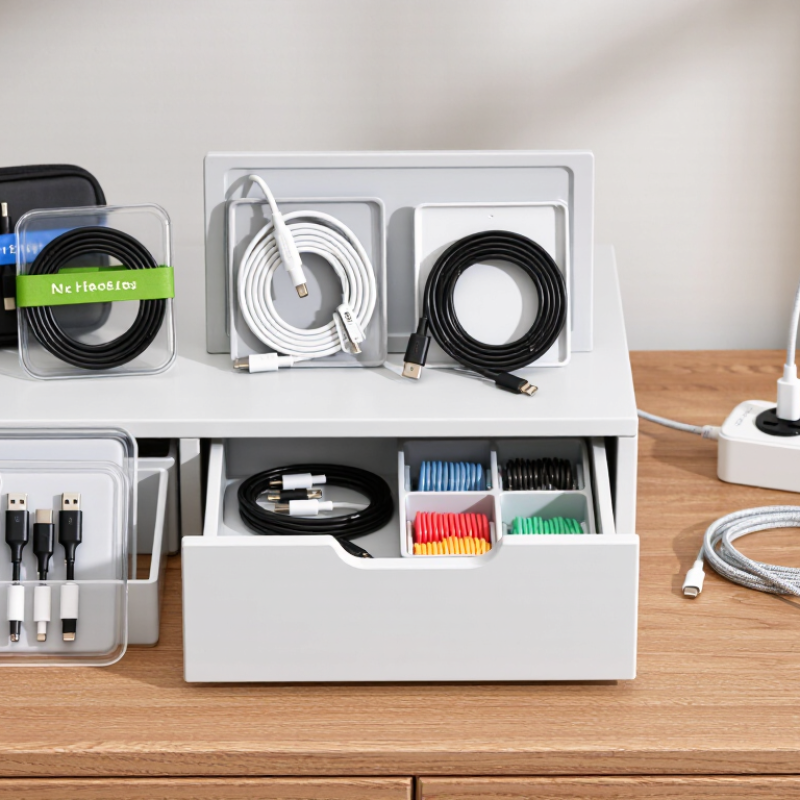
Then separate each group by connector type. Place USB-C cables together, and keep Micro-USB and barrel-plug cables in their own sections. If a device uses an unusual connector, give it a clearly marked pouch rather than forcing it into a broad category. A shallow box with dividers works well; keep each cable loosely coiled, with its label visible. Avoid tight bends near the plug, where repeated strain can damage the connection.

Check the cables as you sort. Look for split insulation, bent plugs, or loose ends, and set damaged cables aside instead of returning them to storage. Keep cables you use daily near the devices they charge. Store occasional-use cables in a separate container. My labels sometimes peel off, so I still have to review the box now and then. It is not a perfect system, but it beats untangling a knot before breakfast.

Coil Cables Safely to Prevent Tangles and Damage

Coiling a charging cable should reduce strain, not create a tight, tidy ring. Let the wire follow its natural curve. Make broad loops about the size of your hand, without pulling the ends taut. Avoid pinching the cable around two fingers; sharp bends can stress the jacket and conductors, especially near the plug. That is where repeated flexing often takes its toll. I still catch myself wrapping cables tightly around adapters. It looks neat, but presses the same small section every time.

Use a soft reusable tie around the middle of the coil, and leave it loose. Skip hard knots, narrow rubber bands, and tight twists. Store the cable where heavier objects cannot crush it. Check both ends before use. A split jacket, exposed wire, or loose connector is a reason to stop using the cable, not to keep it in rotation with a quick patch.

There is a broader reason to inspect electrical equipment. NFPA’s Home Electrical Fires report estimated that electrical distribution and lighting equipment was involved in 34,000 reported U.S. home fires annually, on average, from 2015 to 2019. The report also recorded 470 civilian deaths and $1.3 billion in direct property damage. It does not attribute these fires to coiled charging cables; the figures are a reminder to treat damaged electrical equipment seriously.

Choose Storage Solutions for Home, Travel, and Work

At home, give charging cables a fixed place near the devices they serve. A shallow drawer tray works well for everyday cords, while a small box can hold less-used cables. Coil each cable loosely and secure it with a reusable tie. Tight bends can damage the outer covering over time. Labeling both ends helps when several black cables look alike. Small details matter. Avoid storing damp cables beside sinks or windows, and check for fraying before plugging them in.

For travel, choose a compact zippered pouch with separate sections or elastic loops. Keep the cable for your phone apart from earbuds and larger charging leads, so you can find the right one quickly. A soft pouch protects cables from keys and other hard objects in a bag. Don’t pack them while warm after use; let them cool first. I used to cram every spare cord into one pocket, which seemed efficient until the knots came out. It wasn’t.

At work, a desk tray or a few cable clips can keep frequently used cords within reach without letting them slide behind the desk. Store backup cables in a labeled drawer rather than leaving them plugged in. Every few weeks, remove the ones you no longer use and check the rest for loose connectors or damaged insulation. A storage system does not need to look perfect. It just needs to make the right cable easy to find.

10 Tips to Organize and Store Charging Cables

Choose storage solutions for home, travel, and work. This chart groups ten practical cable-organization tips by their primary setting.

At a glance: The ten tips are divided into four for home, three for travel, and three for work. Use labeled bins or a drawer organizer at home, a compact pouch while traveling, and desk clips or a small caddy at work. Coil cables loosely and label both ends wherever you store them.

Label and Maintain Cables for Easy Access and Longer Use

A charging cable is easy to overlook until you need the right one in a hurry. Label each cable near both ends, where the tag stays visible when the cord is coiled. Use plain descriptions such as “USB-C, desk” or “camera, travel,” rather than labels that only make sense today. A small piece of removable tape works, though it may peel off in a warm bag. Keep it simple.

Tip: Match labels to real storage spots. Place everyday cables in a shallow tray near your charging area, and keep travel cables in a separate pouch. If several cords look alike, add a colored band or a short, reusable tag. Avoid tight knots and sharp bends; repeated strain near a plug can damage the outer covering. A loose loop is usually easier to unwind.

Check cables when you put them away. Look for fraying, exposed wire, bent connectors, or plugs that feel unusually loose. Set damaged cables aside instead of returning them to the drawer. Wipe dust from cords with a dry, soft cloth, and let them cool before storing after use. I still find a stray cable in the wrong pouch sometimes. A quick label check every few months can prevent that small annoyance.

FAQS

How should I coil a charging cable?

Make broad, loose loops about the size of your hand. Let the cable follow its natural curve.

Why should I avoid tight bends near the plug?

Repeated sharp bends can strain the cable’s outer covering and internal conductors. The plug area often takes the most wear.

What should I use to secure a coiled cable?

Use a soft, reusable tie around the middle of the coil. Keep it loose.

Where should I store cables at home?

Use a shallow drawer tray for everyday cords and a small box for spare cables. Keep them away from damp areas and heavy objects.

How can I keep cables organized while traveling?

Pack them in a zippered pouch with separate sections or elastic loops. Keep cords away from keys, and let warm cables cool first.

How can I tell similar cables apart?

Add a small label near both ends, such as “USB-C, desk.” A colored band can help when several cords look alike.

What signs mean a cable should be taken out of use?

Stop using cables with split coverings, exposed wires, bent connectors, or unusually loose plugs. Don’t return damaged ones to the drawer.

How often should I check stored cables?

Look them over when putting them away, and check labels every few months. Wipe away dust with a dry, soft cloth.

Do cable storage systems need to look perfect?

No. They just need to help you find the right cord. I still put one in the wrong pouch sometimes.

Conclusion

Keeping charging cables organized starts with understanding the different cable types, connectors, and devices they serve. Sort cables by device or connector so the right one is easy to find, and coil each cable loosely rather than wrapping it tightly. This simple habit helps prevent tangles, kinks, and damage over time. When deciding how to organize and store charging cables effectively, consider where they will be used: a tidy container or designated drawer can work well at home, while compact pouches and separate compartments can keep cables manageable at work or during travel.

For quicker access, label cables with their device or purpose, especially when several look alike. Store them in consistent, easy-to-reach places, and check them regularly for wear or damage. Remove cables you no longer need and return the others to their assigned spots after use. A few practical routines can reduce clutter, protect cables, and make everyday charging simpler.

Aria

Aria

Aria is a dedicated marketing professional with a deep passion for innovative strategies and a keen understanding of our company's product offerings. With a wealth of experience in the industry, Aria excels at crafting engaging content that highlights the unique features and benefits of our......